> ## Documentation Index
> Fetch the complete documentation index at: https://docs.cosmosid.com/llms.txt
> Use this file to discover all available pages before exploring further.
# Analysis Projects (AP)
> An Analysis Project holds a cohort and every analysis run on it, with each saved result kept as a snapshot.
## What is an Analysis Project?
Modern microbiome research often requires exploring and analyzing multiple types of 'omics data from a defined cohort, using different analytical approaches, algorithms, and visualizations to address specific biological questions. Within a single research project, the same cohort is typically analyzed in several distinct ways.
In Cosmos-Hub 2.0, an **Analysis Project (AP)** is the gateway to running Analysis Modules through the Analysis Studio on the [Cohorts](https://docs.cosmosid.com/untitled-page-5) you assembled with the Query Builder.
## Navigating and managing Analysis Projects in a Study
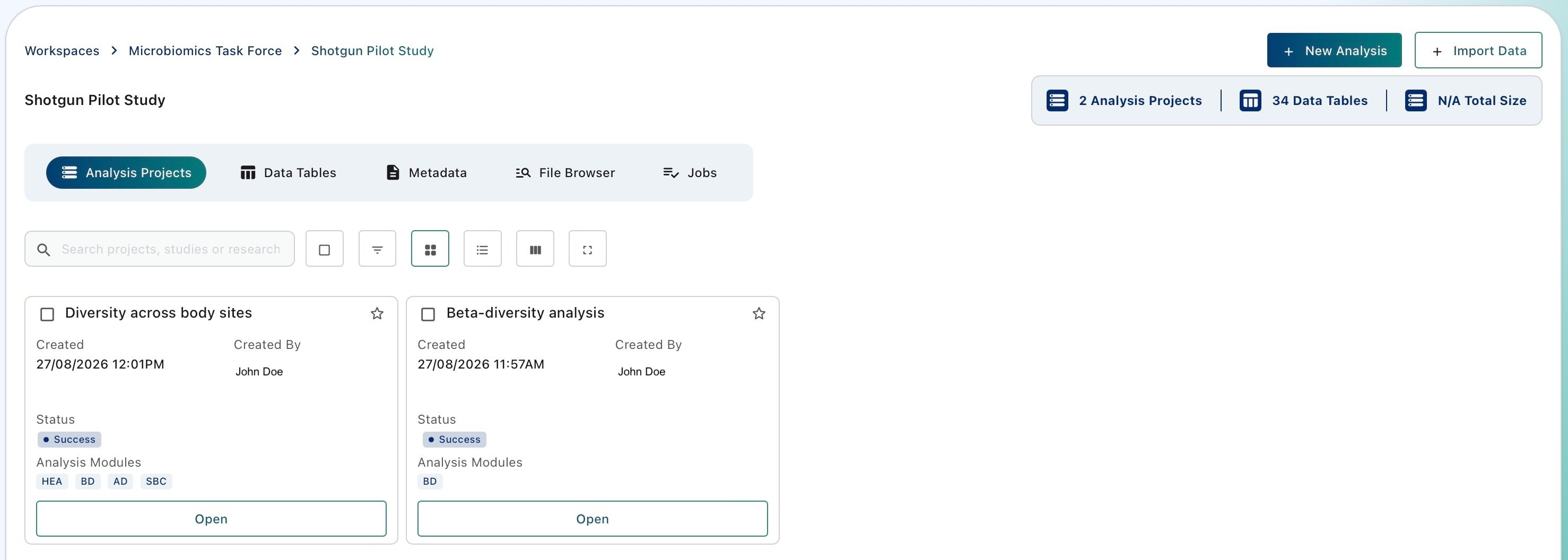
Enter a study to display which Analysis Projects are available. Analyses Projects are listed and can be managed from the '**Analysis Projects**' section of the Study Dashboard.
 #### Creating Analysis Project(s)
Creation of a new Analysis Project is tied to creation of a cohort through the Query builder. Click on '+ New Analysis' to start creating a cohort and an Analysis Project. For more details, visit [Create a cohort with the Query Builder](untitled-page-5).
#### Deleting Analysis Project(s)
Select one or more Analysis Projects and click on the 'Delete' button appearing on the upper right of the interface.
Deleting an Analysis Project is permanent and cannot be undone. The cohort defined for that Analysis Project is deleted, along with every analysis and snapshot it contains. The source data in the Workspace used to build the AP cohort is NOT affected.
#### Renaming an Analysis Project
Select a single Analysis Project and click on the 'Rename' button appearing on the upper right of the interface. Duplicated AP names within the same study are not allowed.
## Searching and filtering Analysis Projects
Use the search bar in the Analysis Projects section of the Study Dashboard to find Analysis Projects and change how they are displayed.
#### Creating Analysis Project(s)
Creation of a new Analysis Project is tied to creation of a cohort through the Query builder. Click on '+ New Analysis' to start creating a cohort and an Analysis Project. For more details, visit [Create a cohort with the Query Builder](untitled-page-5).
#### Deleting Analysis Project(s)
Select one or more Analysis Projects and click on the 'Delete' button appearing on the upper right of the interface.
Deleting an Analysis Project is permanent and cannot be undone. The cohort defined for that Analysis Project is deleted, along with every analysis and snapshot it contains. The source data in the Workspace used to build the AP cohort is NOT affected.
#### Renaming an Analysis Project
Select a single Analysis Project and click on the 'Rename' button appearing on the upper right of the interface. Duplicated AP names within the same study are not allowed.
## Searching and filtering Analysis Projects
Use the search bar in the Analysis Projects section of the Study Dashboard to find Analysis Projects and change how they are displayed.
 1. **Select all** selects every Analysis Project in the list. Available in card view only.
2. **Show Filters** displays filters below the column names. Enter text or numbers to search within a specific metadata column.
3. **Card View** displays Analysis Projects as cards.
4. **List View** displays Analysis Projects as rows in a table.
5. **Manage Columns** sets which metadata columns appear in list view.
6. **Full Screen** expands the list to fill the window.
## Next step: analyse your cohort through [the Analysis Studio](untitled-page-6)
Run diversity, differential abundance, ordination and machine learning modules on your cohort.
1. **Select all** selects every Analysis Project in the list. Available in card view only.
2. **Show Filters** displays filters below the column names. Enter text or numbers to search within a specific metadata column.
3. **Card View** displays Analysis Projects as cards.
4. **List View** displays Analysis Projects as rows in a table.
5. **Manage Columns** sets which metadata columns appear in list view.
6. **Full Screen** expands the list to fill the window.
## Next step: analyse your cohort through [the Analysis Studio](untitled-page-6)
Run diversity, differential abundance, ordination and machine learning modules on your cohort.